
Table of Contents
Introduction
DSST has created custom end-of-trimester report cards that show students and families a comprehensive picture of student data, beyond just trimester grades. On top of grades and attendance, schools can choose to show sections reporting data on Culture metrics from Compass, missing assignment data from IC, and effort scores from IC.
Report Card Sections
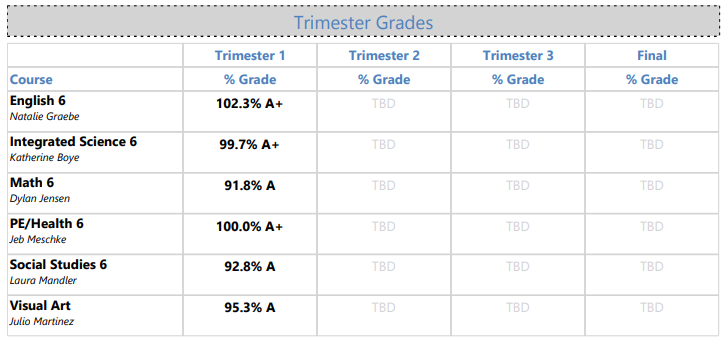
Grades Grid
This section is required, and cannot be turned off. It shows the posted 12 Wks grade from IC (or the in progress "1st Trimester" grade for APS schools).
Attendance
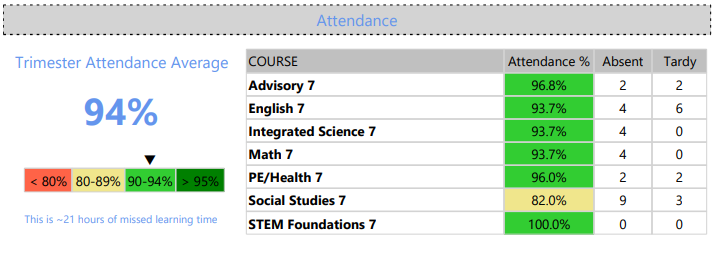
This section is required, and cannot be turned off. It shows the students overall attendance percentage as well as the number of absences and tardies in each course throughout the term.
GPA
This section is optional, and can be turned on or off by schools within the settings sheet. This section shows two GPAs:
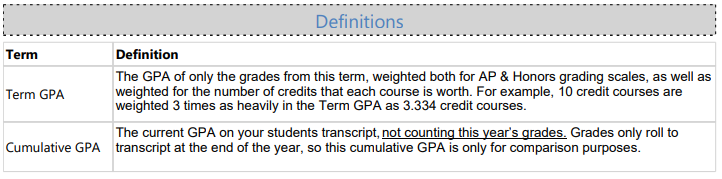
- Term GPA: This is the GPA of the grades displayed in the grades grid, weighted by the number of credits each course is worth. For example, the grade for a 10 credit course is weighted 3 times as much in the GPA calculation as the 3.334 course.
- Cumulative GPA: This is the GPA from the students transcript excluding the grades shown on the report card. Because this is a transcript GPA, and we don't roll grades to transcript until the end of the year, this is not inclusive of the current school year.

When the GPA section is turned on, a GPA definition section is also added at the bottom of the progress report. This definition section is required if the GPA section is turned on:
Intervention Counts
This section is optional. Schools can choose which interventions (if any) they'd like to show in this section. This section shows a week-by-week count of how many interventions were assigned to the student in Compass throughout the term.

Generation, Distribution & Printing
Report cards are automatically generated for all students on a preset date (which can be adjusted at school discretion) at the end of each trimester.
When they are generated, PDF copies of each individual student report cards are placed on the I drive under the "Progress Reports" folder.
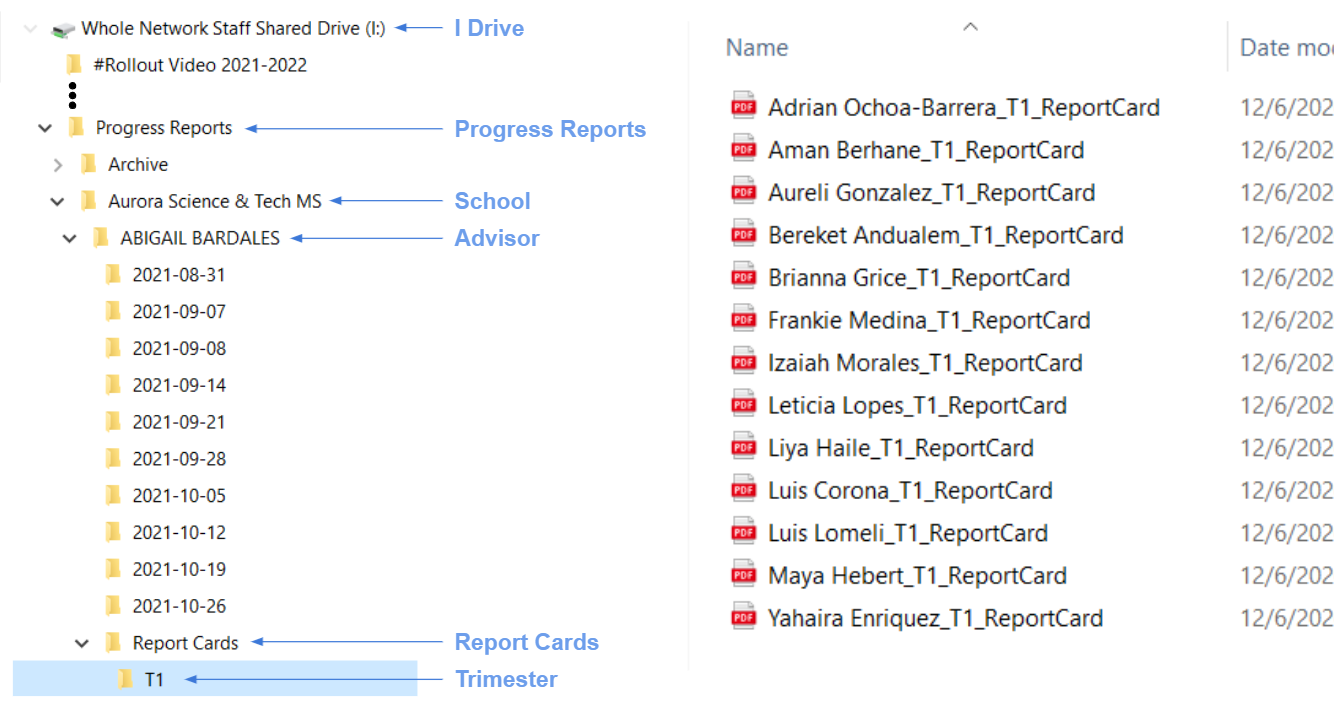
In addition to these individual student PDFs, we also create on giant PDF for each school that contains all of the report cards for all the students at this school, sorted by advisory, so that printing all student report cards is a bit easier. The PDF can be found at I:/Progress Reports/[School Name]/AllReportCards-T1.pdf
Compass Core Value Report Card Generation
If the school would like, we can generate PDFs for each student's Compass Core Value Report card, and drop this PDF right along side the student report cards on the I Drive. To indicate this preference, just select "Generate" in the column "Generate Compass CV Report Card" in the appropriate trimester tab of the Progress Report Settings document.
Note that these CV report cards will also be included as pages in the one big school-wide PDF that's generated with all student report cards.
Printing Report Cards for Entire Schools
To facilitate printing, one giant "merged" PDF is created at the school folder on the I Drive which contains the Report Cards (and Compass Core Value Report Cards, if your school has those generated) for all students in one file. This file is organized by advisory.
These files are titled "AllReportCards-[Trimester].pdf, and are located the school folder...not within individual advisory folders.
Please be patient when opening these files. They are very large, and thus can take a while to load.
Generation Timeline For 2022-23
Below are the default dates by which grades (and/or Effort Scores and/or Compass CV Scores and Advisor Comments if those sections are turned on in your schools settings) need to be posted, along with when the report cards will be generated:
| Trimester |
Data Cutoff Date |
Report Cards Generated On |
| 1st Trimester | Mon. 12/5/2021 | Wed. 12/6/2021 |
| 2nd Trimester | TBD | TBD |
| 3rd Trimester | TBD | TBD |
Schools can change these dates however they would like. The only requirement is that the data Cutoff time is at least one full day before the morning that the school expects report cards to be available on the I drive. To request alternative dates for your school, complete the "Data Entry Cutoff" and "Reports Generated By" columns of the appropriate trimester tab of the Progress Report Settings document.
Other FAQs
If you have further questions about report cards, please reach out to helpdesk@scienceandtech.org, or jake.firman@scienceandtech.org.
Comments
0 comments
Please sign in to leave a comment.