
Purpose: The Workday roles & permissions request form allows staff to request for Workday access to be updated. To understand Workday security roles please view this guide. Any requests not submitted by a School Director or HO leader will need to be approved by the School Director or HO team lead before they are completed.
From your homepage, click on the Requests icon.

STEP 1: Then in the top left-hand box called "Actions" click on the gray button called "Create Request"

STEP 2: On the next screen ("Create Request" screen) in the drop down select "All" then the "Workday Roles & Permissions Request Form" then click “OK” at the bottom of the screen.
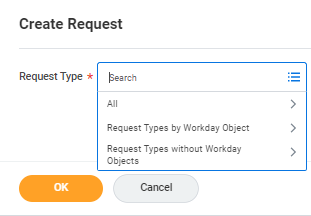
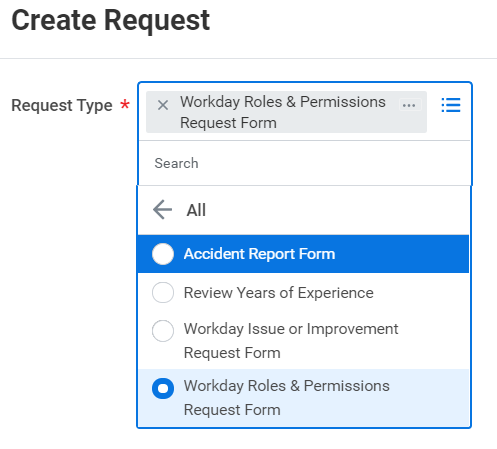
STEP 3: On the next screen you will fill out the request form providing as much detail as possible about what access the person the request is for should have and, if applicable, anything you want to ensure they do not have access to.
STEP 4: Hit Submit at the bottom of the screen. If you have any questions about a submitted request please send an email to your TOPs partner and CC cherish.harris@scienceandtech.org.

Comments
0 comments
Please sign in to leave a comment.