
Use the missing grades report to find out which teachers still need to post their grades. At the end of each trimester, teachers should post to 12 Weeks. For trimester-long courses, you can post a final grade during all three trimesters. For 2 trimester courses, you can post to a final grade during Tri 2 and Tri 3. For year-long courses, you can post to final during tri 3.
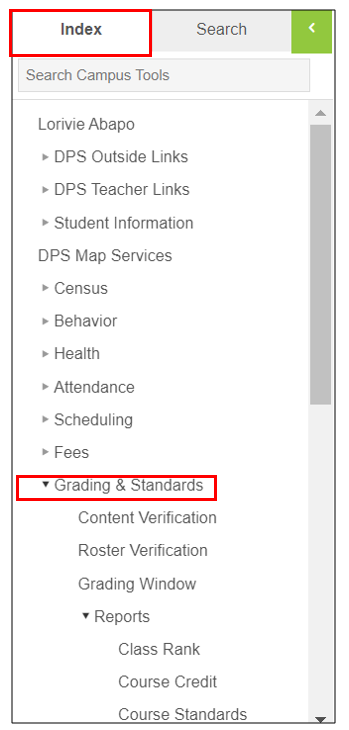
1. In the Campus Tools View, click on “Grading and Standards” to expand the menu on the "Index tab.
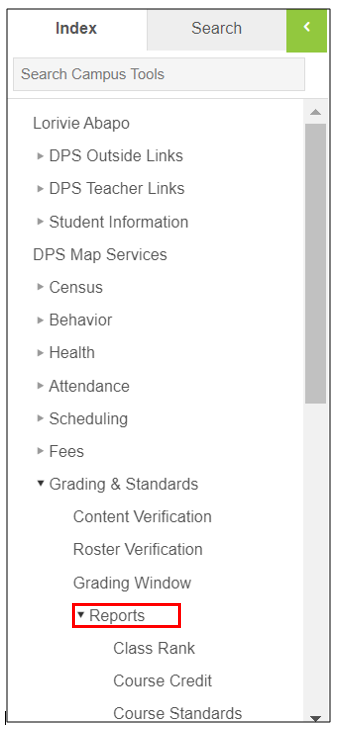
2. Click “Reports” to expand the menu.
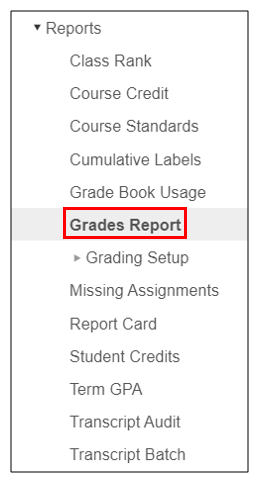
3. Click "Grades Report"
4. Use the below settings to get a recommended Missing Grades report settings:
Grade: All Students
Grading Terms: Choose your Trimester
Select teachers: All or if you want to drill down to a specific teacher, choose the teacher.
Group by: Choose how you want to group the results. Recommended grouping is group by "Course/Section"
Grading task: 12 wks and Final. Or you can pull separate 12 wks and Final reports and choose the "Missing Grades/ Score" option. Optional to check off "show dropped students".
Note: You should always pull a 12 wks report to catch any teachers that haven't posted. If you pull a "Final" report, make sure to look only for classes that should have their final grades posted because that report will show mostly all courses are missing "Final" grades if it's not the end of the year.
For example, if you are pulling a "Finals" report for T1, when you pull a Final missing grades report, just look to see if the classes that are trimester-long coures are not listed in that report.
The missing grades report for the "Final" grading task becomes more important at the end of the year.

4. Click "Generate Report".

Comments
0 comments
Please sign in to leave a comment.