
Overview
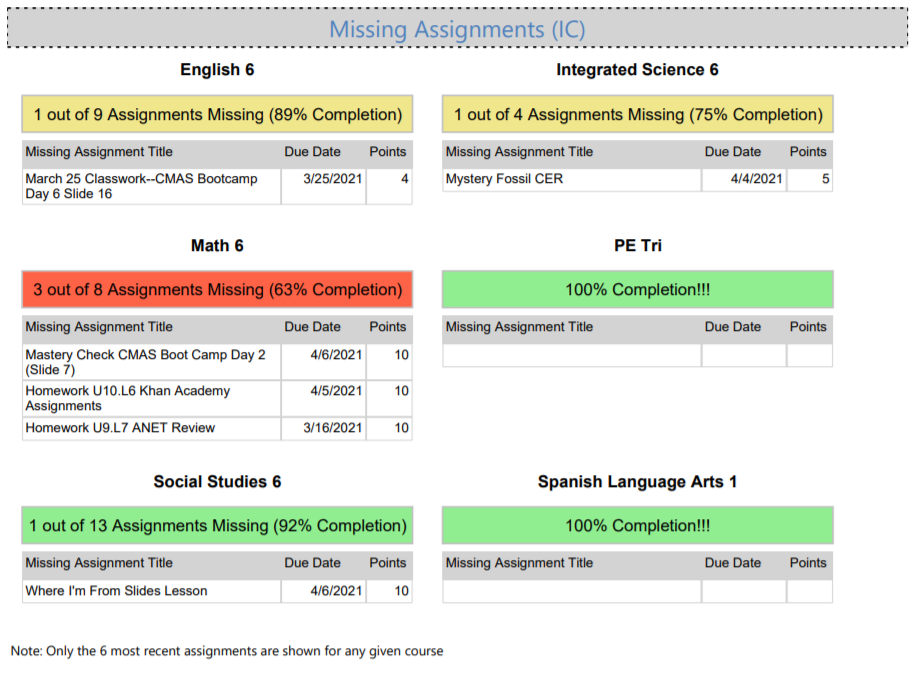
The work completion module on the weekly progress reports shows information about missing assignments from the Infinite Campus gradebook. Like many other modules on the progress report, schools can choose to show or hide this module. This data is pulled nightly from the Infinite Campus gradebook, not from Google Classroom or other sources.
Example
Important Clarifications
- Only courses from the current trimester are shown.
- Only assignments that are flagged as "Missing" in the IC gradebook will be added to the missing count. Zeros in the gradebook that are not flagged as missing will not be counted as a missing assignment.
- The assignment list is sorted by due date, so that the most recent assignment is at the top of the list. All missing assignments from the current trimester are eligible to be shown on the list. For example, there is no threshold like "only the last X weeks of assignments are considered".
- Only the 6 most recent missing assignments will be listed in the assignment list.
- The color coding is based off of percent completion, and has the following thresholds:
- Green = >90%
- Yellow = 75%-90%
- Red = <75%
Turning On This Module
By default, this module is turned off for all schools. If you'd like this module turned on at your school, please have a school leader email Jake Firman at jake.firman@scienceantech.org.
Comments
0 comments
Please sign in to leave a comment.