
Context
Qualtrics is a platform that allows you to create and send surveys. DSST uses Qualtrics for network surveys such as the Mid and End of Year Survey, and the Network Pulse Survey. Any survey that will require a Polaris dashboard to display survey responses, will be required to be sent using Qualtrics. If you do not need a dashboard, you can still use Qualtrics (or Google Forms) to send your survey. In this article you will find a translation of terms used in Qualtrics to support your navigation of the platform.
Key Terms
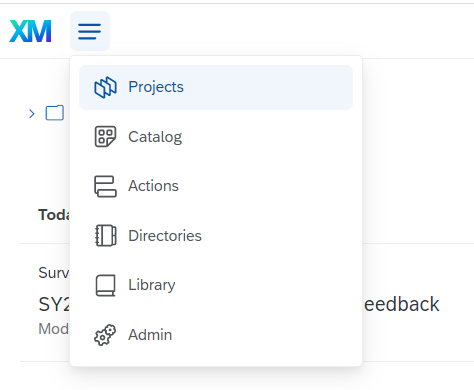
| Qualtrics Term | What it means... | What it does... |
| Project | A project in Qualtrics is a survey | When you log in to Qualtrics you will automatically be taken to your list of projects. If you select Projects from the Menu, you will be taken back to your Project list. Learn more here. |
| Catalog | A catalog is a list of templates | Navigate to the Catalog page to view a list of templates that you can use to create your survey. |
| Actions | An action is defined triggers that initiate an automated response | Navigate to the Action page if you want to set up an action such as sending an email after a survey response is sent. Learn more here. |
| Directories | A Directory is your Contact Lists | Navigate to the Directories page to view and/or create your Contact Lists. Learn more here. |
| Library | A Library is a place to store surveys, graphics and messages so you can easily reuse material | You can store surveys, graphics, messages, and other file types within your Qualtrics libraries. You can access this content by going to the Library page. Learn more here. |
| Admin | The Admin page is for Brand and Division Admin. Only specific people in DSST will have access to this page | The Admin page lets Brand Administrators track, assess, and manage how Qualtrics is used in their organization. Learn more here. |
Comments
0 comments
Please sign in to leave a comment.